Using a temporary email address is a simple yet powerful way to protect your primary inbox from spam, data breaches, and unwanted marketing when signing up for online accounts. This guide provides a complete, step-by-step walkthrough on selecting a reliable temp mail service, creating and using your disposable address for various registrations, and understanding the critical do’s and don’ts. We cover the significant privacy benefits, potential limitations, and essential security practices to ensure you use this tool effectively and safely.
Have you ever hesitated to sign up for a free online course, a discount newsletter, or a forum because you didn’t want to clutter your primary email inbox? Or maybe you’ve downloaded a file from a website that immediately felt like a spam trap. This is where the clever tool of temporary email, often called “temp mail,” becomes your digital bodyguard. It’s a straightforward concept with powerful implications for your online privacy and sanity. This comprehensive guide will transform you from a curious beginner to a confident, safe user of disposable email addresses for all your non-essential online account creations.
We’ll move beyond the basic idea and dive deep into the practical realities. You’ll learn exactly how to pick a service that won’t vanish with your data, the precise steps to use it for everything from app trials to forum registrations, and the crucial boundaries you must never cross. Think of this as your ultimate handbook for leveraging temp email intelligently, keeping your main identity secure while still accessing the internet’s countless free resources.
Key Takeaways
- Purpose: Temp mail is a tool for privacy and spam prevention, not for important, long-term accounts like banking or primary email.
- Selection: Choose a reputable provider with a clear privacy policy, adequate inbox lifespan, and a browser extension for convenience.
- Process: The workflow is simple: generate an address, use it for sign-up, verify the email in the temp inbox, then discard the address.
- Limitations: You cannot recover a temp email or password; it’s a single-use, fire-and-forget tool for specific scenarios.
- Risk Awareness: Understand that while it hides your main email, the temp provider itself can see the emails you receive, so don’t use it for highly sensitive data.
- Best Practice: Never use a temp email for critical accounts (financial, main cloud storage, social media) where account recovery is essential.
- Ethical Use: Temp mail is for legitimate privacy protection, not for fraudulent activities, abuse of free trials, or bypassing bans maliciously.
📑 Table of Contents
- What Exactly is Temp Mail and How Does It Work?
- Step-by-Step: How to Use a Temp Mail Service
- Major Benefits: Why You Should Use Temp Mail
- Critical Risks and Limitations You Must Understand
- Best Practices for Safe and Effective Use
- Alternatives and When to Use Something Else
- Conclusion: Empowering Your Digital Life with Discretion
What Exactly is Temp Mail and How Does It Work?
At its core, a temporary email service provides you with a random, disposable email address that exists for a short, predefined period—usually a few hours to a few days. It functions like a public mailbox at a coffee shop: anyone can put something in it (send an email to it), but only you have the key to check it (via the temp mail website). The service generates the address on the fly, receives incoming emails on its servers, and displays them to you in a web-based inbox. Once the time limit expires or you manually delete the inbox, the address and all its contents are permanently erased from existence.
The Technology Behind the Disposability
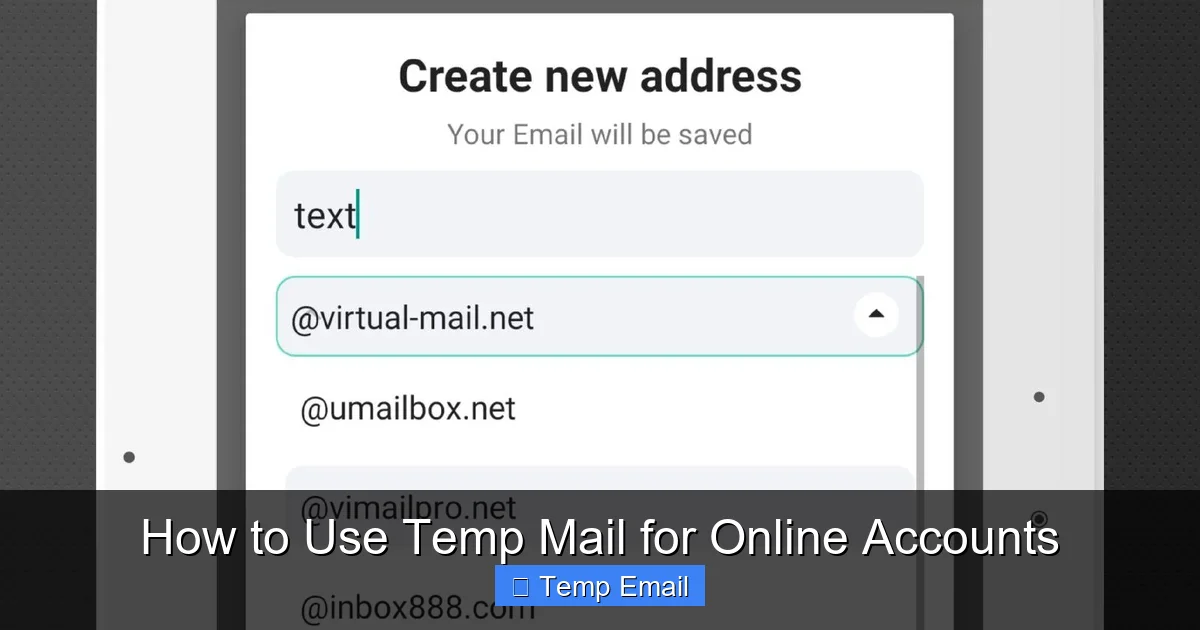
These services don’t create unique, persistent mailboxes for each user in the traditional sense. Instead, they often use catch-all domains. When you request an address like [email protected], the service’s mail server is configured to accept any email sent to *@tempmail.demo. It then sorts incoming messages based on the unique local part (abc123) and displays them in the corresponding session. This efficient system allows them to offer millions of potential addresses without the storage overhead of standard email providers.
Step-by-Step: How to Use a Temp Mail Service
Using temp mail is famously simple, but doing it correctly requires a few mindful steps. Here is a detailed, practical walkthrough.

Visual guide about How to Use Temp Mail for Online Accounts
Image source: tmailor.com
1. Choosing Your Provider: Not All Temp Mails Are Created Equal
This is the most critical step. A poor choice can lead to instant spam, lost verification emails, or privacy issues. Look for these features:
- No Registration Required: The best services generate an address instantly on their homepage without asking for any personal details.
- Inbox Lifespan: Check how long the inbox remains active. 10 minutes is too short for many verifications; 24-48 hours is a good standard.
- Browser Extension: Services like Temp-Mail.org offer extensions that auto-fill and manage your temp address, a huge convenience.
- Custom Domain Option: Some providers let you choose from several domains (e.g., @mailinator.com, @guerrillamail.com). Having options can help if one domain is blocked by a website.
- Clear Privacy Policy: Read it. Does it state they do not log or sell your received emails? Reputable ones will have a strict no-logs policy for received content.
Popular, long-standing options include Temp-Mail, Guerrilla Mail, and Mailinator (public inboxes, so be cautious). For this guide, we’ll use the generic “Temp-Mail.org” as our example.
2. Generating Your Disposable Address
Navigate to your chosen provider’s website. You will typically see a large, randomly generated email address displayed prominently, along with a timer counting down the inbox’s remaining life. That’s your new, temporary identity. Copy it to your clipboard. No password, no username, just the address.
3. Using It for Account Creation
Go to the website or service where you need an email (e.g., a free ebook download, a gaming site beta sign-up, a forum). In the email field, paste your copied temporary address. Fill in any other required details (often a username and password you create for that site). Complete the sign-up process.
4. Receiving and Accessing the Verification Email
Most services will send a verification link to the email you provided. Do not leave the temp mail site! Switch back to the tab with your temporary inbox. You should see a new email arrive within seconds or minutes. Click on it to open the content. Find the verification link or code, click it or copy it, and return to the sign-up page to complete the process. The email will vanish from the temp inbox when the session expires.
5. Post-Verification: What to Do (and Not Do)
Once you’ve clicked the verification link and gained access to the service or downloaded the file, your job with that temp address is done. Do not try to log in to that account again using the temp email—you won’t be able to receive password resets. Simply close the tab. If you need to use that service again in the future, you will likely need to sign up again with a new temp address. The old account associated with the expired email is now inaccessible.
Major Benefits: Why You Should Use Temp Mail
The value proposition of temporary email is clear and compelling for the right use cases.

Visual guide about How to Use Temp Mail for Online Accounts
Image source: dl.memuplay.com
Slash Spam and Marketing Emails to Zero
This is the #1 reason people use temp mail. Every time you use your primary email for a freebie, a contest, or a one-time service, you’re adding your address to a marketing list. Those lists get sold, shared, and leaked. A temp address acts as a sacrificial buffer. All the promotional fluff goes to the disposable inbox, which self-destructs, keeping your main inbox pristine for personal and professional communication.
Enhance Privacy and Reduce Data Footprint
In an era of data harvesting, every account you create is a potential data point linked to your identity. Using a temp email severs the direct, persistent link between an online service and your primary digital identity (your main email). It minimizes the number of entities that have a permanent channel to contact you and reduces your overall exposure in the event of a company’s data breach.
Bypass Mandatory Sign-Ups for Gated Content
How many times have you wanted to read an article, access a research paper, or see a whitepaper, only to be hit with a “Enter your email to continue” wall? Temp mail lets you effortlessly bypass these gates without committing your real address. You get the content instantly, and the publisher gets an email that will bounce in 24 hours. It’s a clean, low-friction win.
Test Services and Software Safely
If you’re a developer, tester, or just a curious tech enthusiast, you might need to create multiple test accounts for an app or service. Using your real email for 20 test accounts is messy. Temp mail allows you to generate unique addresses for each test instance, keeping your production and testing environments completely separate and clutter-free.
Critical Risks and Limitations You Must Understand
Temp mail is a tool, and like any tool, it has sharp edges. Blindly using it can create new problems.
Visual guide about How to Use Temp Mail for Online Accounts
Image source: image.winudf.com
The Inherent Insecurity of Public Inboxes
Remember, the temp mail provider has access to every email sent to that address. While reputable ones claim not to log them, you are fundamentally trusting a third party with potentially sensitive information. Never use a temp email for:
- Password resets on important accounts.
- Receiving bank statements, credit card offers, or legal documents.
- Any communication containing personal identification numbers (SSN, passport), financial data, or confidential business information.
Account Recovery is Impossible
This is the most common pitfall. If you sign up for a service using a temp email and later forget your password, you are locked out forever. The “Forgot Password?” function will send a reset link to an inbox that no longer exists. The account is dead. Therefore, the rule is absolute: any account you might need to access again in the future—even just once a year—must be tied to your real, permanent email.
Website and Service Blocks
Many popular platforms (Google, Facebook, major banks, Apple, Microsoft) actively block known disposable email domains. They know these addresses are often used for abuse or spam. If you try to sign up with a temp address on these sites, you’ll likely get an error message saying the email domain is invalid. This is a feature, not a bug, for those platforms, but it means temp mail has limited utility for mainstream services.
Ethical and Legal Boundaries
Using temp mail to circumvent a website’s terms of service, create fake accounts for manipulation (e.g., social media bots, review spamming), abuse free trial limits fraudulently, or evade legitimate bans is unethical and may be illegal. Use this tool for its intended purpose: protecting your primary inbox from unwanted correspondence, not for deception or fraud.
Best Practices for Safe and Effective Use
To get the most out of temp email without falling into traps, adopt these habits.
Maintain a Clear Mental Separation
Categorize your online accounts mentally. Tier 1: Critical (banking, primary email, cloud storage) – always use your real email. Tier 2: Important but recoverable (secondary shopping sites, professional networks) – use a dedicated, long-term secondary email. Tier 3: Low-stakes, disposable (freebies, one-time content access, forum lurking) – this is the domain of temp mail. Never blur these lines.
Use a Dedicated Browser Profile or Incognito Window
To avoid session mix-ups, open an incognito/private browsing window when using a temp email service. This prevents your main browser cookies and logins from interfering and keeps your temp mail session isolated. Some browser extensions for temp mail also handle this well.
Always Check the Inbox Immediately After Sign-Up
Verification emails can sometimes land in spam folders (of the temp service) or be delayed. Stay on the temp mail site for at least 2-3 minutes after submitting the sign-up form and refresh the inbox periodically until the email arrives. Don’t navigate away and assume it will be there later.
Never Use Temp Mail for Two-Factor Authentication (2FA)
2FA codes are time-sensitive and critical for account security. Receiving them on a disposable inbox that might disappear before you can type in the code is a recipe for being locked out. 2FA must always go to a reliable, accessible, and permanent email or authenticator app.
Manage Your Expectations
Understand that the service you’re signing up for may flag or delete your account if they detect a disposable email during their internal review or if you attempt a sensitive action (like changing the email later). The account may work for its initial purpose but could be purged later. This is acceptable for a one-time download, but not for building a lasting profile.
Alternatives and When to Use Something Else
Temp mail isn’t the only tool. Here’s when to consider other options.
The Dedicated “Spam” or “Burner” Email Address
Create a free email account (e.g., with Gmail, ProtonMail) specifically for online sign-ups you want to keep but don’t want in your main inbox. Use this for services you might use semi-regularly but still view as a potential spam source (e.g., a hobby newsletter, a store you shop at occasionally). This address is permanent, so you can recover accounts and receive important notifications. It requires maintenance (occasional login to delete spam) but is more robust than a temp address.
Email Aliasing Services (Like SimpleLogin or Firefox Relay)
This is the modern, superior evolution of the disposable email concept. These services create unique, forwardable email aliases (e.g., [email protected]) that forward to your real inbox. You can disable an alias at any time, stopping all future emails. The key advantage: the emails appear in your main inbox, you can reply from the alias, and you maintain full control and permanence. It’s the best of both worlds for privacy and utility, though some services have usage limits on free tiers.
When to Just Use Your Real Email
If the service is:
- Financial (banking, investing, PayPal).
- Core to your digital identity (main email provider, Apple ID, Google Account).
- A subscription you intend to keep long-term (Netflix, Spotify, software SaaS).
- Any service where account recovery, legal notices, or critical updates are sent via email.
…then use your primary, permanent email address without hesitation. The risk of losing access far outweighs any minor spam concern.
Conclusion: Empowering Your Digital Life with Discretion
Mastering the use of temporary email is a small but significant step in taking control of your digital footprint. It’s not about being paranoid; it’s about being prudent. By strategically deploying a disposable address for the vast ocean of low-stakes, one-off interactions on the web, you erect a sturdy firewall around your primary communication channel. You declutter your mind and your inbox, reduce your attack surface for data breaches, and assert a measure of ownership over your personal information.
Remember the golden rule: permanence for what matters, disposability for what doesn’t. Use the step-by-step process we’ve outlined, respect the limitations, and always prioritize security over convenience for your critical accounts. As the internet continues to monetize attention and data, tools like temp mail and email aliasing services become not just helpful, but essential components of a modern, privacy-conscious digital strategy. Go ahead, try it for your next free ebook download. You’ll wonder how you ever signed up for anything without it.
Frequently Asked Questions
Is using temp mail legal?
Yes, using a temporary email service is completely legal. It is a legitimate privacy tool. However, using it to commit fraud, create fake identities for malicious purposes, or violate a website’s terms of service is illegal and unethical.
Can I recover a temp email account if I lose the password?
No, you cannot. Temporary email addresses have no password recovery mechanism. Once the inbox expires or you close the session, the address and all associated data are permanently deleted. Any accounts created with that address are irrecoverable.
Will a temp email work for Netflix or Facebook?
Almost certainly not. Major platforms like Netflix, Facebook, Google, and banks maintain lists of disposable email domains and actively block them during sign-up. You will receive an error message. Temp mail is intended for smaller websites, forums, and content gates.
Is temp mail safe for receiving important documents?
No, it is not safe. Since the inbox is public and the provider can access all emails, you should never use a temp address for sensitive information like legal contracts, financial statements, official government correspondence, or anything containing personal identification numbers.
How long do temp emails usually last?
The lifespan varies by provider. Common durations are 10 minutes, 1 hour, 6 hours, or 24-48 hours. Always check the provider’s timer before using the address to ensure it will last long enough for you to receive and click a verification link.
What happens to my temp email after it expires?
After the time limit expires, the email address is permanently retired and recycled. The inbox and all emails within it are deleted from the provider’s servers. The address may be given to a completely different user in the future.
Leave a Reply